Programming Languages Matlab 3101 - Class 2
3/12/08, Instructor: Blake Shaw
Contents
Review
can make variables, numbers, lists, matrices, can index them in interesting ways, and apply mathematical functions to them
% working with variables
3+4

a = 5
b = 7;

x = a^b


%working with lists
list1 = 3:5:94

list1 .^ 2

[list1(1:5).^2, list1(6:end).^3]


% basic eigenvalue decomposition
A = rand(10, 10);

[v, d] = eig(A);


% lets factor and recompose a large number
x = factor(345345435);

prod(x)
ans =

     7


a =

     5


x =

       78125


list1 =

  Columns 1 through 9

     3     8    13    18    23    28    33    38    43

  Columns 10 through 18

    48    53    58    63    68    73    78    83    88

  Column 19

    93


ans =

  Columns 1 through 4

           9          64         169         324

  Columns 5 through 8

         529         784        1089        1444

  Columns 9 through 12

        1849        2304        2809        3364

  Columns 13 through 16

        3969        4624        5329        6084

  Columns 17 through 19

        6889        7744        8649


ans =

  Columns 1 through 4

           9          64         169         324

  Columns 5 through 8

         529       21952       35937       54872

  Columns 9 through 12

       79507      110592      148877      195112

  Columns 13 through 16

      250047      314432      389017      474552

  Columns 17 through 19

      571787      681472      804357


ans =

   345345435
control flow in scripts
if, for, while, try, catch
a = 3;
b=4;

a > b
(a<b) + (a<b)

a == b

a ~= b

a >= b
ans =

     0


ans =

     2


ans =

     0


ans =

     1


ans =

     0
if statements
if/else, booleans with ands and ors, and other relational operators
A = floor(10*rand(2, 2));
B = floor(10*rand(2, 2));

if (sum(A, 1) > 3)
    X = 4;
else
    X = 5;
end


if (a < 100) && (b < 5)
    X = 1000
else
    X = 0
end

if (a < 100) || (b < 2)
    X = 1000
else
    X = 0
end

if (a<100 && (b-10) ~= -3) || a == 6
   X = 1000
end

if X > 0 && eig(X) <= -1
    X = 1000
end
X =

        1000


X =

        1000


X =

        1000
while loops
similar to if statements... careful about infinite loops, contorl-c to exit
x = 100;

while x > 50
    x = x - log(x)
end

% this is an infinite loop -- it runs forever!!!

%{
% these are also multiline comments!
while 1
   x = x+1;
end
%}
x =

   95.3948


x =

   90.8368


x =

   86.3277


x =

   81.8696


x =

   77.4645


x =

   73.1146


x =

   68.8226


x =

   64.5911


x =

   60.4230


x =

   56.3216


x =

   52.2906


x =

   48.3337
for loops
count up, count down, and by different increments
1:1

3:36

3:2:36

45:-3:0

for i=1:5
   i
   X = rand(i, i);
   sum(sum(X))
   max(max(X))
end

% some stuff does not need to be looped
for i=1:2:8
    i^2
end

(1:2:8).^2

indices = ceil(100*rand(10, 1))';

X = (1:100).^2;

runningTotal = 0;
for i=indices
    i
    runningTotal = runningTotal + X(i);
end

runningTotal

% write without a loop?

runningTotal2 = sum(X(indices))


N=10;
A = rand(N, N);

for i=1:N
    for j=1:N
        A(i, j) = A(i, j)^2 + sin(pi * (i/N));
    end
end


for i=1:30
   if i < 15
      x = 5;
   end
end
ans =

     1


ans =

  Columns 1 through 9

     3     4     5     6     7     8     9    10    11

  Columns 10 through 18

    12    13    14    15    16    17    18    19    20

  Columns 19 through 27

    21    22    23    24    25    26    27    28    29

  Columns 28 through 34

    30    31    32    33    34    35    36


ans =

  Columns 1 through 9

     3     5     7     9    11    13    15    17    19

  Columns 10 through 17

    21    23    25    27    29    31    33    35


ans =

  Columns 1 through 9

    45    42    39    36    33    30    27    24    21

  Columns 10 through 16

    18    15    12     9     6     3     0


i =

     1


ans =

    0.6892


X =

    0.6892


i =

     2


ans =

    1.5115


ans =

    0.7482


i =

     3


ans =

    5.0154


ans =

    0.9961


i =

     4


ans =

    7.5280


ans =

    0.9106


i =

     5


ans =

   10.7234


ans =

    0.9448


ans =

     1


ans =

     9


ans =

    25


ans =

    49


ans =

     1     9    25    49


i =

    41


i =

    10


i =

    14


i =

    95


i =

    96


i =

    58


i =

     6


i =

    24


i =

    36


i =

    83


runningTotal =

       32379


runningTotal2 =

       32379
try and catch
good for catching and dealing with errors
for i=1:10
   A = rand(10, 3);
   B = rand(5, ceil(3*rand()));

   try
       result = A * B';
   catch
       disp('Loop caused an error');
       disp(sprintf('Size of B: %f', size(B, 2)));
   end

end

result
Loop caused an error
Size of B: 1.000000
Loop caused an error
Size of B: 2.000000
Loop caused an error
Size of B: 1.000000
Loop caused an error
Size of B: 2.000000
Loop caused an error
Size of B: 1.000000
Loop caused an error
Size of B: 2.000000
Loop caused an error
Size of B: 2.000000
Loop caused an error
Size of B: 2.000000

result =

    0.8307    0.2646    0.2503    0.5516    0.6000
    0.8535    0.3891    1.0981    0.7426    0.4695
    0.2060    0.1262    0.5221    0.2010    0.0639
    0.2028    0.1325    0.4066    0.3813    0.1107
    1.0569    0.4497    1.0756    0.9264    0.6404
    0.5744    0.2536    0.5934    0.5758    0.3564
    0.8658    0.3429    0.6255    0.7948    0.5819
    0.3319    0.1730    0.5149    0.3906    0.1790
    0.5614    0.2001    0.3310    0.3952    0.3756
    0.6990    0.2908    0.6150    0.6527    0.4488
disp and sprintf, helpful printing in loops
like c, %g, %d, %s
X = 5;

disp(X)

X = [1, 34, 54, 6]
disp(X)

disp('this is a string');

X = 5;

disp(sprintf('X is equal to %d and some number is %d', X, 10));


str = 'blake';
x = length(str);
disp(sprintf('"%s" has %d characters', str, x))


x = [1, 234, 3,4, 34];
disp(sprintf('x is equal to %d\n', x))


pi
disp(sprintf('%1.100g', pi))
     5


X =

     1    34    54     6

     1    34    54     6

this is a string
X is equal to 5 and some number is 10
"blake" has 5 characters
x is equal to 1
x is equal to 234
x is equal to 3
x is equal to 4
x is equal to 34


ans =

    3.1416

3.141592653589793115997963468544185161590576171875
formatting ouput with the format command
short, long
more practice with creating matrices
zeroes, ones, eye, diag, linspace, :
more practice with creating indexes
:, randperm, sub2ind, ind2sub
more plotting
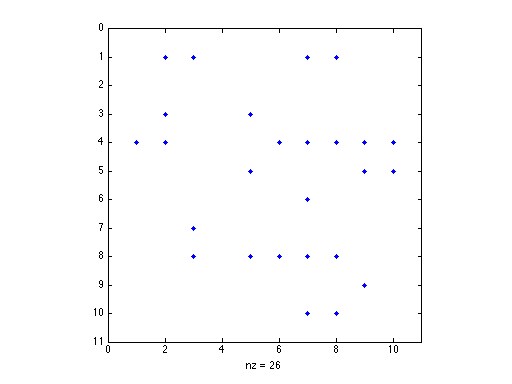
using imagesc to plot a matrix, or spy, title plots, set axes, change colormap, specify which figure
A = rand(10, 10);
A(2, :) = 0;
imagesc(A)
colormap('gray');
title('my random matrix');


A(find(A > 0.2)) = 0;

spy(A)
avoiding loops
repmat, find
N = 10;
x = 1:N;

repmat(x, N, 1)
ans =

  Columns 1 through 9

     1     2     3     4     5     6     7     8     9
     1     2     3     4     5     6     7     8     9
     1     2     3     4     5     6     7     8     9
     1     2     3     4     5     6     7     8     9
     1     2     3     4     5     6     7     8     9
     1     2     3     4     5     6     7     8     9
     1     2     3     4     5     6     7     8     9
     1     2     3     4     5     6     7     8     9
     1     2     3     4     5     6     7     8     9
     1     2     3     4     5     6     7     8     9

  Column 10

    10
    10
    10
    10
    10
    10
    10
    10
    10
    10