 |
LXSR.
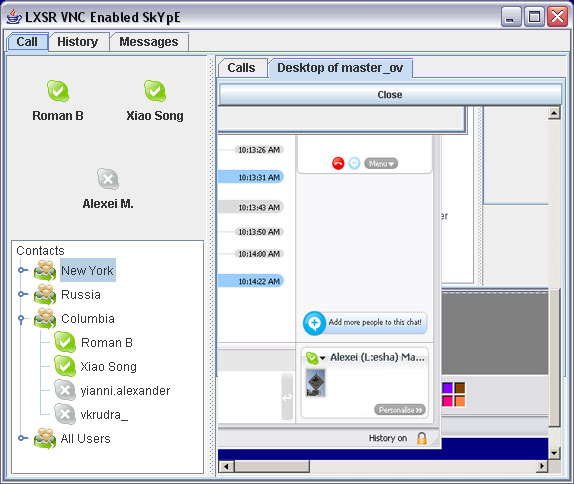
In this product we married skype and VNC. We added an ability
for skype users to share their desktop without having to know anything
at all about VNC or remote computing. All preferences, passwords,
ports, etc. are hidden from the user; all they have to do is check "share
my desktop" on their side, and the person on the other end will have
a tab with the view of the shared desktop. In the upper left corner
you see the "Fave Three" panel, which helps you keep people you call
the most within your reach. You can make calls by drag-and-drop,
and view visual history of your calls using a zoomable timeline. (Alexei Masterov, Roman Bystritskiy, Xiao Song, and Alexandra Stoeva) |
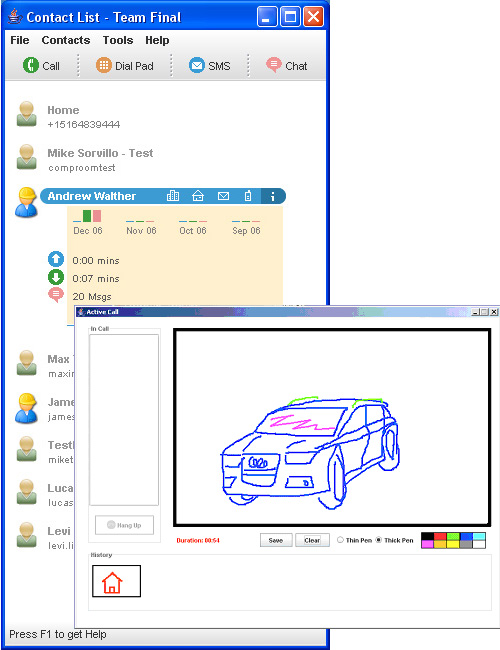 |
Team Final Project. Our application is designed for people who
need to remotely communicate both audibly and visually. This is potentially
useful for a variety of people, from friends who can draw a map to give
directions, to designers who can sketch out and collaborate on ideas, to
businessmen who can draw up charts and share notes while talking. Our
contact list puts all skype functionality at your fingertips, and our sketchpad
allows users to communicate visually. |
 |
Skype4Kids.
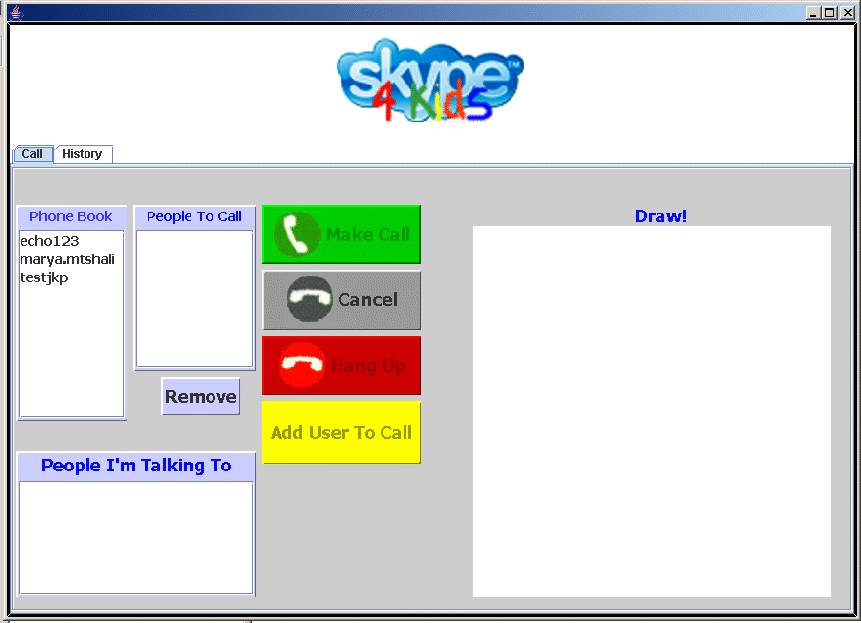
We developed Skype4Kids for children ages 5 through 10. Our main goal was
to make the system very simple to use, so we focused on making the UI self-explanatory
and reduced the number of clicks a user has to make to get something done.
To appeal to children, we used bright colors and large buttons. We also
decided to give parents the ability to choose whom their child can call
and whom they can receive calls from. Parents can also monitor their child’s
call history. In addition, because children love drawing, we created a
built-in sketchpad for Skype4Kids. All users that are part of a call (we
support conference calling), and who are running Skype4Kids (as opposed
to other versions of Skype) can draw on a common sketchpad board using
tools such as pencils and paintbrushes. |
 |
SupportGroupSkype. Support groups represent a vast and important component of America’s
non-institutionalized mental and physical health apparatus. These
groups range from the highly organized Alcoholic Anonymous, with hundreds
of chapters and thousands of members, to unorganized local groups, such
as a community mourning the loss of a beloved child.
SupportGroupSkype seeks to provide these groups with three main services:
- An expressive (and free) voice communication network that allows
two or more members to interact and encourage one another.
- A method of documenting and measuring the level of interaction among
the group.
- A non-intrusive assessment system that that helps other members
of the group identify those in need of extra or specialized support.
SupportGroupSkype uses a social network, modeled as a graph, for its
main interface. Each user sees other members of the group as nodes
in the network, with individual node decoration indicating such things
as online status, participation in a conversation, mood, and the group’s
collective assessment for that individual. Edge decorations are
used to describe connection history among users, and describe the regularity
of individual connections as well as latency. Users can navigate
the social network via direct manipulation, inspect other members of
the group (general information and assessment), examine their interaction
history, and initiate individual phone calls where necessary. Information
areas and popup windows on the periphery display particular details about
selected individuals, provide secondary controls for initiating telephone
calls, and announce important information. During individual and
conference calls, a special set of “mood controls” are available
to help communicate what each user is feeling. |
 |
Skypebook. Our group designed a enhanced Skype client, targeting the Facebook user
group. As a result, we name it 'Skypebook', meaning it's a tool that brings
the social networks of both Skype and Facebook together. To give Facebook
users a comfortable and familiar look and feel, the contact list of Skypebook
looks exactly like Facebook's "Friend List" and the history section
has the same style as Facebook's "News Feed". With a Skype account,
a Facebook user can make free phone calls, send chat, and even view Facebook
friends' profiles. In addition, a Skypebook user can send an "acticon",
an animated version of an emoticon, to another party in a call, which we believe
to add more fun to the user's experiences. |
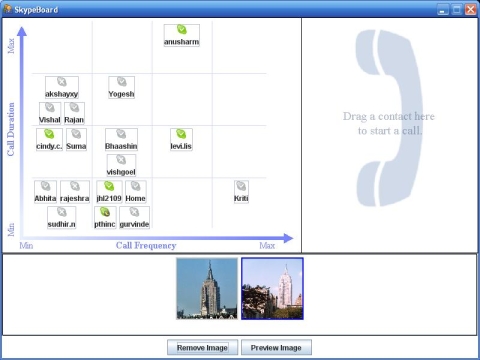 |
SkypeBoard. This UI is targeted towards international students who wish
to collaboratively view photos with their family members back home. All
contacts are arranged on a histogram according to the number and length
of past calls. We implemented a simple direct manipulation approach to handle
calls and view images. To place calls, the user can drag and drop contacts
from the histogram onto the CallBoard on the right side of the screen. To
make a conference call, more contacts can be dropped onto the CallBoard.
To end a call, contacts are dragged out of the CallBoard. To collaboratively
view photos, any connected user can drag image URLs from a browser onto
the ImageBoard at the bottom of the screen. The images are synchronized
with all connected users. The preview and removal of images are also synchronized.
|
 |
BAWSkype. BAWSkype is targeted to casual users familiar with Skype's functionality
and equivalent icons, who wish to access Skype's main functions with more
speed and efficiency. We utilized a radial menu to implement its functionality.
The distance from the cursor to each function will be a small constant.
Also, the appropriate angle of selection will be rather wide, since only
4 functions will be available in each menu, which allows a large area of
directional error for each selection. As a result, a casual user can access
these functions with more speed and efficiency. Also, such a radial menu
is rather visually intuitive and has a very small learning curve for more
novice users. |
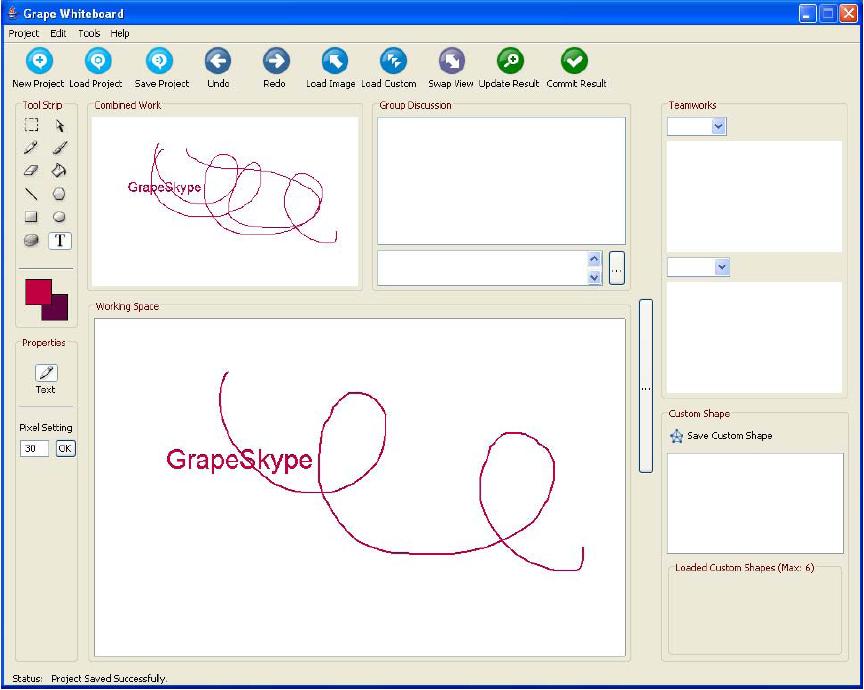 |
Grape. Grape Skype is targeted at providing a
user interface
through which people
can work and cooperate easily on their design job, besides
talking and discussing verbally. Grape Skype is specially designed for
people in different locations to work on the same design project.
These people can be artists, architects or any group who want to work
on the same project together simultaneously, and discuss and share work
or ideas with each other.
Each user has his own work area, which shows just his work. He can draw by hand, load predefined
geometry primitives and upload pictures. This area can be viewed by other users, but cannot
be changed by other users. Each user also has a common work area, which selectively combines their
own work with that of others. Users can easily retrieve
the history of all design procedures, or share them with others. |
| |
|